How to Gift Skins in Fortnite (2026): Requirements, Steps and Why the Gift Button Is Grey

Yes, you can gift skins in Fortnite, but only items that are in the item shop today, and only to a friend. You open the item, tap the gift option rather than the buy button, pick the friend and a gift box, and confirm; the V-Bucks come out of your balance. Epic's help article and the Fortnite Wiki list four requirements: two-factor authentication on, account level 2 or higher, the friend on your list for at least two days, and no more than five gifts in a rolling 24 hours (checked 10 October 2026).
You cannot gift something you already own from your locker, you cannot gift V-Bucks, and a gift cannot be refunded once it is sent. If the gift button is greyed out, one of those rules is almost always the reason, and the troubleshooting tree below finds which one in under a minute.
The requirements for gifting
Epic's own gifting article is the source for these rules. Its page blocks automated readers, so we read its text through search results on 10 October 2026 and cross-checked it against the Fortnite Wiki's gifting page the same day. The game itself is the final word: if a rule changes, the gift screen tells you before anyone else does.
| # | Requirement | Rule | If you don't meet it |
|---|---|---|---|
| #1 | Two-factor authentication | Must be on for your Epic account | The gift screen won't let you continue |
| #2 | Account level | Level 2 or higher | Play until you reach level 2 |
| #3 | Friendship | Recipient on your Friends list for at least 2 days | Wait until 2 days have passed |
| #4 | Daily limit | 5 gifts per rolling 24 hours | Wait for a slot to come back |
| #5 | What you send | Items currently in the item shop | Locker items and V-Bucks can't be sent |
| #6 | Delivery | Recipient must log in to receive it | The gift waits for them |
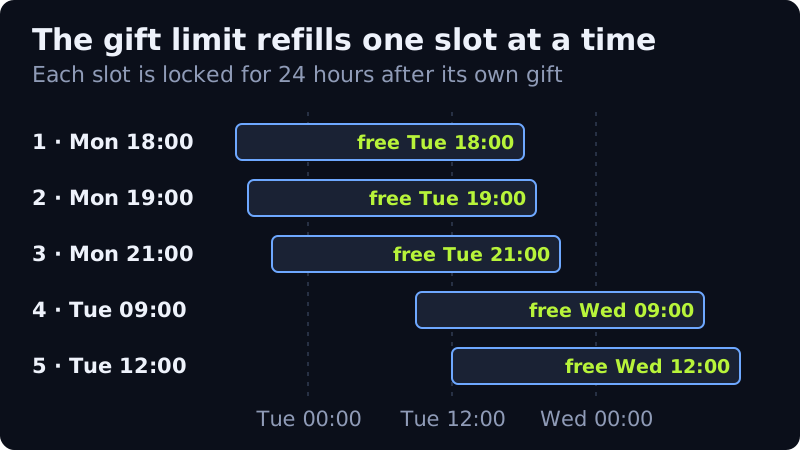
Two of these trip people up more than the rest. The two-day friendship rule counts from when you became friends, so adding someone the day before a birthday is too late. And the five-gift limit is not a daily reset at midnight or at the shop reset: each gift you send frees its slot again exactly 24 hours later.
Some older guides still quote different limits from earlier years of the feature. The figures in the table are the ones Epic's current article gives; if a page tells you otherwise, check its date.
How to gift a skin in Fortnite, step by step
Gifting works the same way on PC, console and mobile, because it all happens inside the item shop. You need enough V-Bucks for the item before you start; the gift is charged to you exactly like a purchase.
- Open the item shop and select the skin or bundle you want to send.
- Choose the gift option instead of the purchase button. If it is greyed out, go to the troubleshooting section below.
- Pick the friend from your list. Search by their Epic display name so the gift goes to the right person; names that look alike are a common mistake.
- Choose a gift box. There are four default boxes, plus seasonal ones unlocked through passes.
- Confirm. The V-Bucks leave your balance immediately and your friend receives the item the next time they log in.
If you pick several friends for the same item, each one is a separate gift and a separate charge, and each counts against your five. Custom text messages were removed from gifts years ago, so the box is the only personal touch. If you are short of V-Bucks for a gift, a region-matched V-Bucks card is one way to top up; that is an affiliate link, and our V-Bucks prices guide compares it with buying directly from Epic.
Can you gift skins you own from your locker?
No. A gift is a new purchase from the shop, sent to someone else, so the item has to be on sale today. Skins already in your locker are bound to your account and cannot be transferred, gifted or traded. That also means you cannot gift an item that has rotated out; if your friend wants something from last week, you have to wait for it to come back.
This is why timing matters for gifts. The shop changes every day at 00:00 UTC, which is the evening before in the US. Our shop reset times by time zone tell you how long an item has left, and the dated shop snapshot shows what was on sale when we last checked.
What you can't gift
Even inside the shop, some things are not giftable. The Fortnite Wiki's list, read on 10 October 2026, matches what Epic's article describes:
- V-Bucks, in any amount.
- Passes bought with V-Bucks. The Battle Pass, OG Pass, Music Pass and LEGO Pass can be gifted, but only as real-money purchases, and Battle Pass gifting is switched off towards the end of each season.
- Pass levels and level bundles.
- Real-money offers other than the passes, and the Fortnite Crew subscription.
- Dynamically priced bundles when the recipient already owns one or more items in them. This has been the rule since update v31.40.
- Anything to yourself. Self-gifting was turned off in February 2021.
If the recipient already owns the exact item, the gift cannot be sent to them either. There is no way to check a friend's locker from your side, so if you are unsure, ask them first.
Why the gift button is grey
A greyed-out gift option means the game has already decided the gift cannot go through. Work down this list in order; the first "no" is your answer.
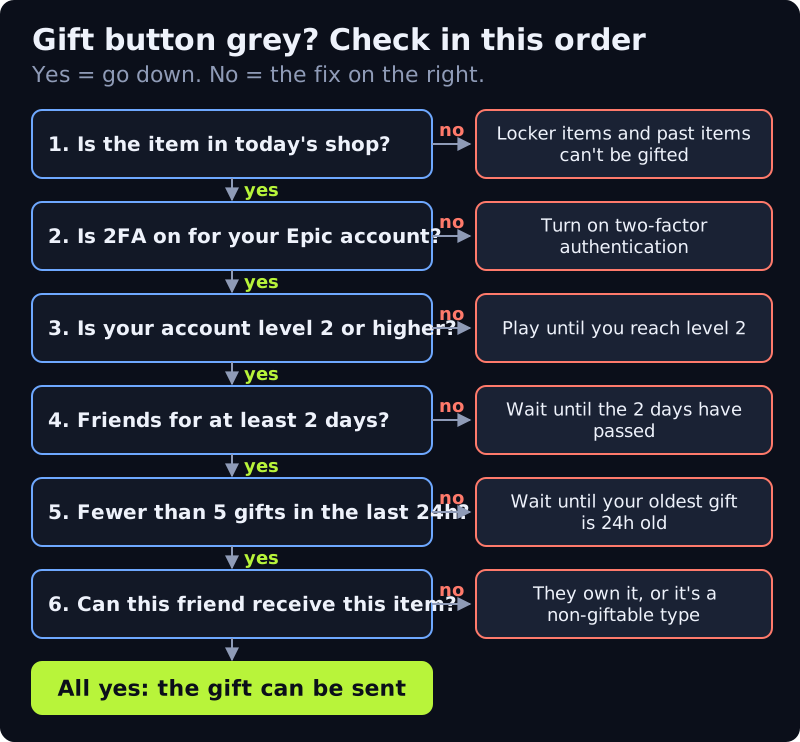
Two-factor authentication is the fix most people need. You turn it on in your Epic account settings on the website, using an authenticator app, SMS or email. If the option is still grey after you turn it on, restart the game and check again. The level requirement only affects brand-new accounts.
The daily limit is the one that confuses people because the timer is invisible. The game does not show when your next slot comes back, so keep a note of when you sent each gift if you are sending several in a row. Each slot returns 24 hours after its own gift, not all at once.
Gifts and refunds
Gifts are non-refundable. Epic's gifting article says so, and its refund article lists gifted purchases among the things a Return Ticket cannot cover. Once you confirm, the V-Bucks are gone even if you picked the wrong friend or they already had the item in another style. That is the strongest reason to check the display name twice and ask the recipient before you send something expensive.
For your own purchases the rules are different: you can cancel within 24 hours if you have not used the item, and Return Tickets cover some purchases for 30 days. The basics are in how the Fortnite item shop works.
Edge cases worth knowing
- Your friend changed their display name. Search for the new name; the gift goes to the account, not the old name.
- The item leaves the shop before they log in. It is already theirs. Delivery waits for their next login, whatever the shop shows.
- You want to gift a bundle they partly own. If it is a dynamically priced bundle, you cannot gift it to them. Buy the individual pieces they are missing instead, if those are sold separately today.
- You are near the end of a season. Battle Pass gifting switches off as the season closes, so gift a pass early.
If someone offers to gift you skins in return for your login details, or asks you to pay them outside the game so they can gift you an item, walk away. Real gifts only ever come from a friend's own account through the shop, and they never need your password.
Frequently asked questions
Can you gift skins in Fortnite?
Yes. You can gift any giftable item that is in the item shop today to a friend who has been on your list for at least two days, as long as you have two-factor authentication on and your account is level 2 or higher.
Can you gift skins you own from your locker?
No. Gifts are new purchases from the current item shop. Items already in your locker are tied to your account and cannot be gifted, traded or transferred.
How many gifts can you send per day in Fortnite?
Five in any rolling 24 hours, per Epic's help article and the Fortnite Wiki, checked 10 October 2026. Each slot comes back 24 hours after the gift that used it.
How long do you have to be friends to gift in Fortnite?
At least two days on your Friends list. Add the person well before the day you want to send the gift.
Can you refund a gift in Fortnite?
No. Gifts are non-refundable, and gifted purchases are excluded from Return Tickets, so check the recipient's display name before you confirm.
New to how the rotation works? Start with our guide to how the Fortnite item shop works.